Solved

Mobile pass invisible

  • Jul 16, 2021 12:46 AM UTC
  • 13 replies
  • 461 views

Hi, after updating the app the mobile pass is no longer present and I can't add it!  I leave tomorrow, ho can i do??

Best answer by Nanja

Hi @Gioele and @Ellen De Doncker, I am sorry to hear that you are experiencing issues. I kindly ask you to follow the instructions so that we can prioritize and work on fixing it for you.

First you will need to reinstall the latest app version and do the actions that weren't working previously. If the issue is still there, please enable the error logs in the app (go to '’more'’  → click on '’settings'’ in the top right corner and enable error logging. Once done, we ask you to perform the actions one last time (as with enabling this setting we have permission to follow your actions). 

View original

13 replies

Forum|alt.badge.img+10
  • Railmaster
  • Jul 16, 2021 7:40 AM UTC

Hi, after updating the app the mobile pass is no longer present and I can't add it!  I leave tomorrow, ho can i do??

You're not the only one :(

Contact support ASAP:
https://eurail.zendesk.com/hc/en-001/requests/new


Ellen De Doncker

Same problem! Having a panick attack right now and no one is answering 


Forum|alt.badge.img+10
  • Railmaster
  • Jul 16, 2021 7:47 AM UTC

Same problem! Having a panick attack right now and no one is answering 

Please also use the link above to contact customer support so they know that many people are suffering and the problem gets a high priority.

@Nanja, I suppose developers are already working on this problem?


Ellen De Doncker

Same problem! Having a panick attack right now and no one is answering 

Please also use the link above to contact customer support so they know that many people are suffering and the problem gets a high priority.

@Nanja, I suppose developers are already working on this problem?

I sent 10 emails and contacted the agent and via messenger and no one replies. I am now in Napoli and should get to Rome today. Can I go to the train station here and get a paper pass to replace my mobile one for now?


Forum|alt.badge.img+10
  • Railmaster
  • Jul 16, 2021 8:02 AM UTC

I sent 10 emails and contacted the agent and via messenger and no one replies. I am now in Napoli and should get to Rome today. Can I go to the train station here and get a paper pass to replace my mobile one for now?

As far as I know, a ticket office cannot replace a mobile pass. But since it looks like this problem was caused by Eurail, they should reimburse any replacement ticket you have to buy because of the problem.


Forum|alt.badge.img+8
  • Retired Community Manager
  • Answer
  • Jul 16, 2021 8:31 AM UTC

Hi @Gioele and @Ellen De Doncker, I am sorry to hear that you are experiencing issues. I kindly ask you to follow the instructions so that we can prioritize and work on fixing it for you.

First you will need to reinstall the latest app version and do the actions that weren't working previously. If the issue is still there, please enable the error logs in the app (go to '’more'’  → click on '’settings'’ in the top right corner and enable error logging. Once done, we ask you to perform the actions one last time (as with enabling this setting we have permission to follow your actions). 


Forum|alt.badge.img+10
  • Railmaster
  • Jul 16, 2021 8:36 AM UTC

First you will need to reinstall the latest app version and do the actions that weren't working previously. If the issue is still there, please enable the error logs in the app (go to '’more'’  → click on '’settings'’ in the top right corner and enable error logging. Once done, we ask you to perform the actions one last time (as with enabling this setting we have permission to follow your actions). 

Thanks, for me that worked. My pass was visible again after updating to version 18.1.1.


  • Author
  • Right on track
  • Jul 16, 2021 8:45 AM UTC

Hi @Gioele and @Ellen De Doncker, I am sorry to hear that you are experiencing issues. I kindly ask you to follow the instructions so that we can prioritize and work on fixing it for you.

First you will need to reinstall the latest app version and do the actions that weren't working previously. If the issue is still there, please enable the error logs in the app (go to '’more'’  → click on '’settings'’ in the top right corner and enable error logging. Once done, we ask you to perform the actions one last time (as with enabling this setting we have permission to follow your actions). 
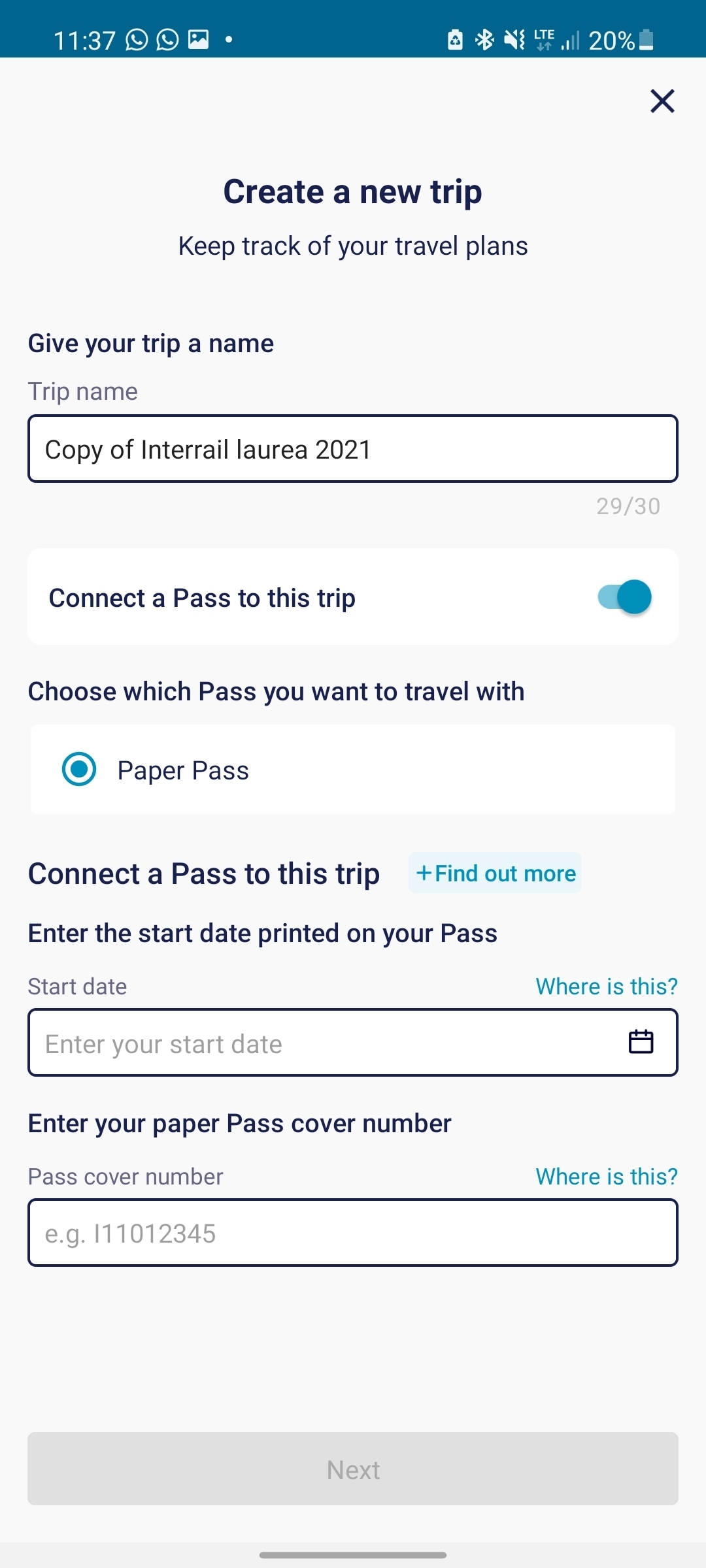
Now working, after updating. I still have a problem with reservations.  I can't add my friend's mobile pass to my trip.  there is only the paper pass option


Forum|alt.badge.img+8
  • Retired Community Manager
  • Jul 16, 2021 9:27 AM UTC

Hi, you can't have 2 Passes connected to one trip. You will need to duplicate your trip and add your friends' Pass to this duplicated trip. 


  • Author
  • Right on track
  • Jul 16, 2021 9:38 AM UTC

I know, but when i duplicate it i can choose online paper pass


Forum|alt.badge.img+8
  • Retired Community Manager
  • Jul 16, 2021 10:00 AM UTC

Hi, thanks for the screenshot. Our Customer Support team will get back to you within the next 30 minutes by email to assist you further. 


Ellen De Doncker

Hi @Gioele and @Ellen De Doncker, I am sorry to hear that you are experiencing issues. I kindly ask you to follow the instructions so that we can prioritize and work on fixing it for you.

First you will need to reinstall the latest app version and do the actions that weren't working previously. If the issue is still there, please enable the error logs in the app (go to '’more'’  → click on '’settings'’ in the top right corner and enable error logging. Once done, we ask you to perform the actions one last time (as with enabling this setting we have permission to follow your actions). 
Thank you so much for your helpful reply! This worked for me too!


  • Author
  • Right on track
  • Jul 16, 2021 10:44 AM UTC

Hi, thanks for the screenshot. Our Customer Support team will get back to you within the next 30 minutes by email to assist you further. 

Thank you